What You Should NOT Paste Into AI Tools (And What's Actually Safe)
Every time you paste something into ChatGPT, Claude, or Gemini, you're uploading it to a server. That server processes it, stores it (probably), and may train future models on it (depending on your settings and which tool you're using).
Most people don't think about this. They paste in contracts, medical records, customer data, employee reviews, trade secrets, financials, passwords, API keys. I've watched people do it.
Here's what's safe to share, what's not, and how to use AI tools without handing over everything you own.
What Happens to Your Data When You Use AI Chat Tools
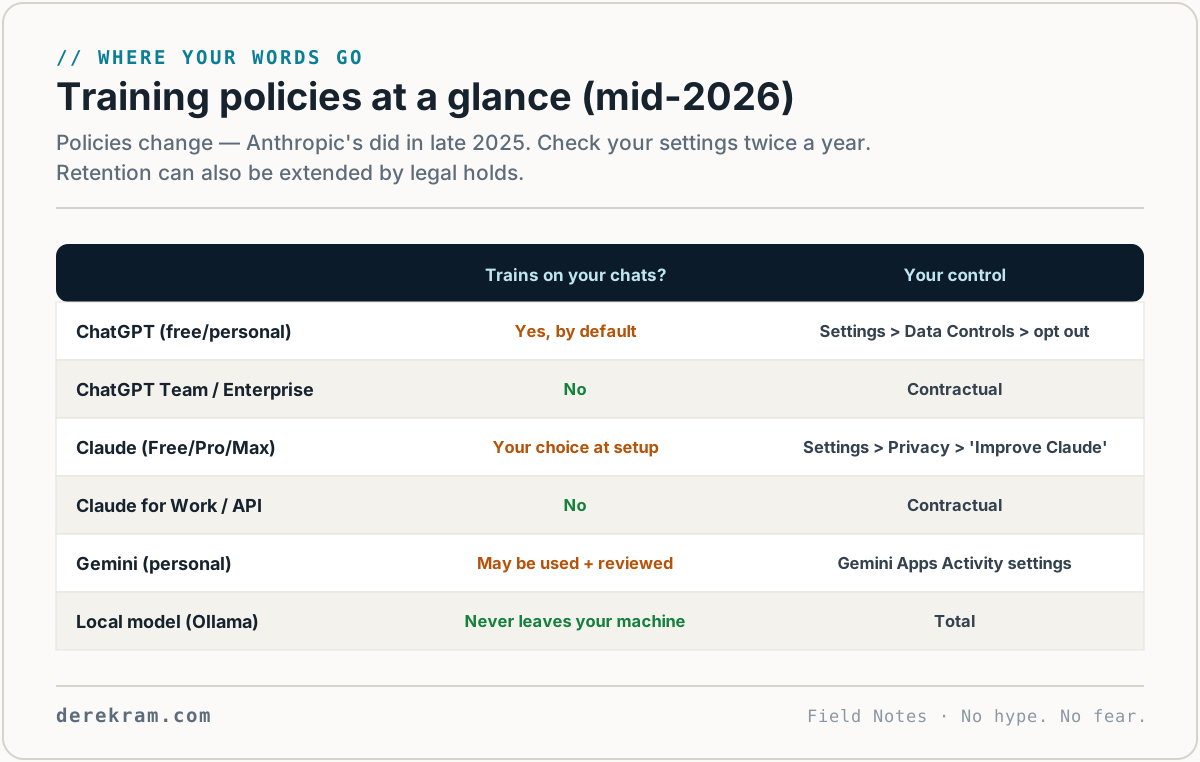
It depends on the tool and your settings. But the baseline is: your conversation data goes to the company's servers. What they do with it varies.
ChatGPT (free): By default, your conversations can be used for training. You can opt out in Settings → Data Controls → "Improve the model for everyone." Even with opt-out, OpenAI still processes your data to provide the service. They hold it for up to 30 days for abuse monitoring — and legal holds can extend retention, which is one more reason never to paste secrets.
ChatGPT (Team/Enterprise): OpenAI doesn't train on your data. Period. Still processed for service delivery. If you're using ChatGPT for work, use the paid plan.
Claude (Anthropic): Claude now asks every consumer user — Free, Pro, and Max — to choose whether chats may be used for training (Anthropic changed this policy in late 2025). Check Settings → Privacy → Improve Claude. Business and API traffic is not used for training. Anthropic has a stronger privacy posture than OpenAI, but the same rule applies: if you wouldn't publish it, think twice.
Google Gemini: Google's free tier may use conversations for training. Paid Google Workspace accounts don't have training enabled. Google has more complex data handling because conversations may interact with other Google services.
Local models (LM Studio, Ollama): If you run a model on your own computer, nothing leaves your machine. For anything sensitive, this is the right approach. But you need a decent GPU and some technical setup.
The Don't-Ever-Paste List
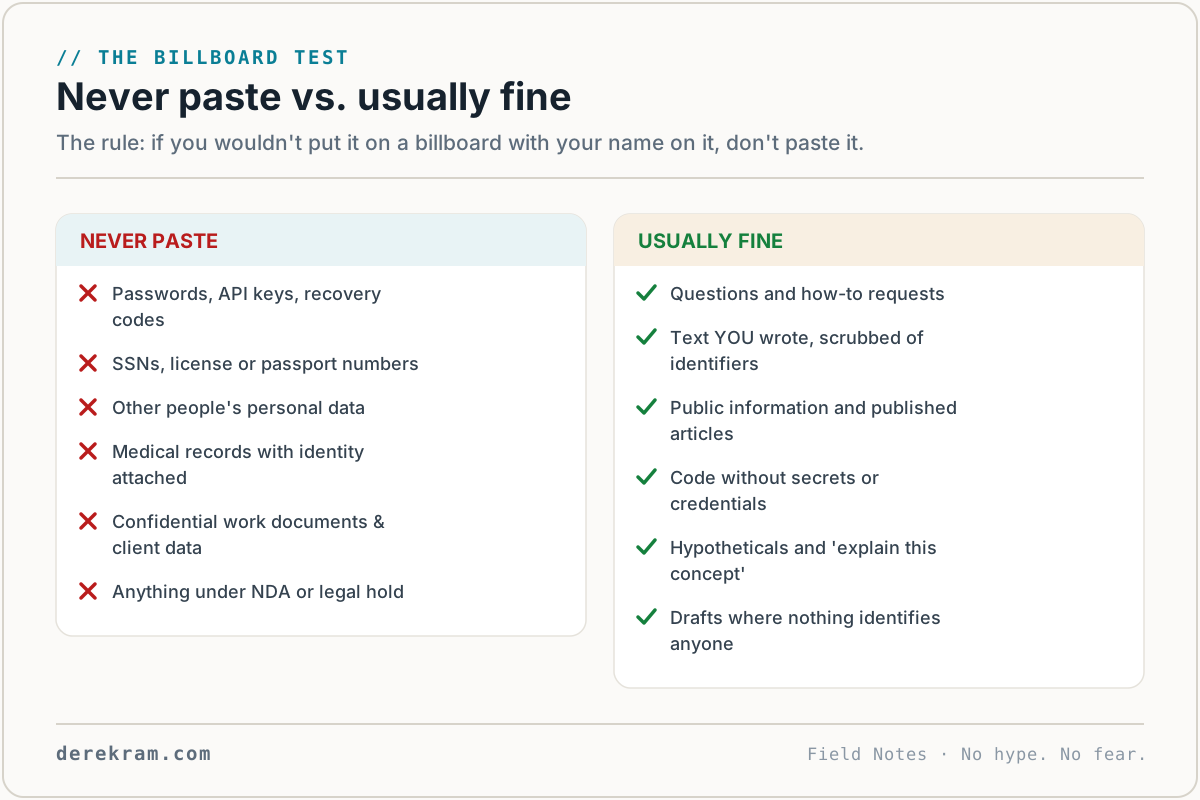
These should never go into a cloud AI chat tool. Under any circumstances.
1. Passwords, API keys, access tokens. If a key leaks, the damage is immediate and often automated — bots scan for leaked credentials constantly. Once it's in a conversation, assume it's compromised. Rotate it.
2. Customer or client data. Names, emails, phone numbers, addresses, payment information, account details. This isn't just bad practice — it may be a legal violation. GDPR, CCPA, HIPAA, and other regulations don't care that you used a "trusted AI tool."
3. Medical records or health information. HIPAA applies. ChatGPT and Claude are not HIPAA-compliant services. If you need AI for medical use, use a purpose-built HIPAA-compliant solution, not a general chat tool.
4. Financial account numbers, tax returns, bank statements. Full financial documents contain routing numbers, account numbers, social security numbers. You don't want these in a training dataset.
5. Confidential business documents. Trade secrets, unreleased product specs, merger discussions, legal strategy, employee reviews (even anonymized), supplier pricing, negotiation positions. If your competitor got this document, would it hurt you? Then don't paste it.
6. Private conversations or messages from other people. That text thread with your coworker, those DMs, that email chain — the other person didn't consent to having their words fed to an AI. This is trust-destroying when discovered.
7. Legal documents with PII. Contracts, court filings, settlement agreements. Redact names, addresses, case numbers, and anything else identifying before pasting.
8. Photos of people without consent. AI image and vision tools process photos you upload. Don't upload photos of people who haven't agreed to it — especially kids, employees, or clients.
What IS Usually Safe to Share
You can paste these without losing sleep. Use judgment.
When in doubt: Would you post this on your public blog? If yes, paste it. If no, don't.
Practical Tips for Using AI Tools Safely
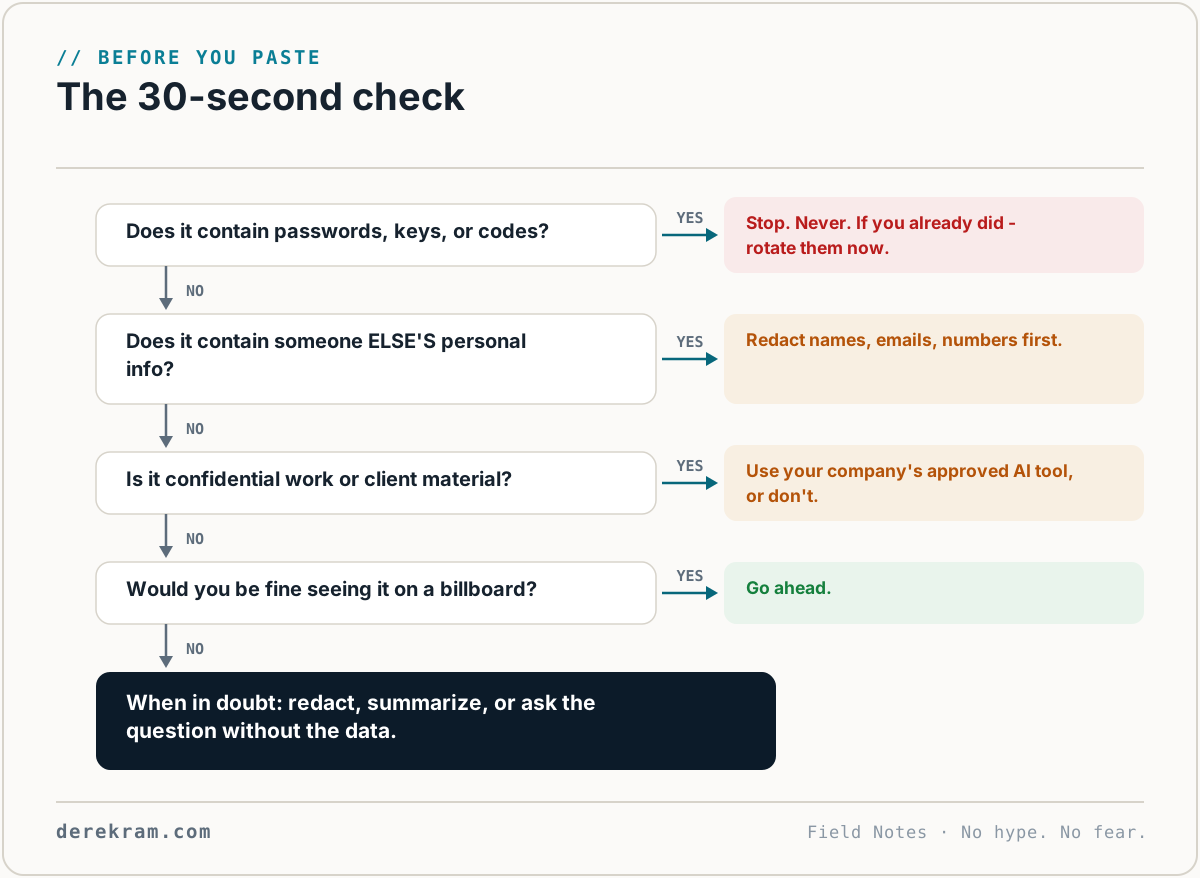
Turn off training data collection. Every major AI tool has a setting for this. Turn it off. ChatGPT: Settings → Data Controls. Claude: training depends on your privacy setting — verify it is set the way you want.
Use temporary/conversation-only chats. ChatGPT offers "Temporary Chat" mode — conversations aren't saved to history. Claude has no equivalent mode — instead, confirm the training toggle in Settings → Privacy is off. Use temporary modes for one-off sensitive queries.
Redact before pasting. If you need AI help with a document, strip identifying information first. Replace names with [NAME], numbers with [NUMBER], locations with [LOCATION]. The AI doesn't need to know it's John Smith from Columbus, Ohio earning $72,000 — it just needs to know there's a person with income to calculate against.
Use a local model for sensitive stuff. Install Ollama or LM Studio. Download a small model like Mistral or Llama 3. Everything stays on your computer. This is the only genuinely private option.
Never assume "delete conversation" actually deletes it. The button removes it from your view. What happens on the server side isn't always clear. Assume the data exists somewhere.
Treat AI tools like a coworker you barely know. You'd ask them to explain a concept. You'd let them read a draft. You wouldn't hand them your tax returns, your customers' credit cards, or your company's secret roadmap.
The Bottom Line
AI chat tools are useful. I use them every day. But they're cloud services, not confidants. Everything you type gets processed on someone else's server.
The rule of thumb is simple: if you'd be uncomfortable seeing it on a billboard with your name attached, don't paste it.
Most people don't need to stop using AI. They need a 30-second gut check before pasting.
Get the AI Privacy Checklist — a one-pager with the complete don't-paste list and safety settings for each major tool. Free.
Get the 5-Minute Digital Safety Checklist
Four things that make you harder to target. No jargon. No fear. Free.
Get the Checklist →