The VPN Conversation Nobody's Having Honestly
VPN ads have convinced millions of people that a VPN makes them anonymous online and protects them from hackers. Neither of these things is true.
VPNs do something useful. Just not what the marketing says.
I use a VPN. I recommend VPNs in specific situations. But the gap between what VPNs actually do and what people think they do has become a problem — because people buy VPNs thinking they're protected, then make risky decisions.
Let's fix that.
What a VPN Actually Does
A VPN creates an encrypted tunnel between your device and a server somewhere else. Your internet traffic goes through that tunnel instead of directly to websites.
This does two things:
1. Hides your IP address from the sites you visit. Websites see the VPN server's IP address, not yours. Your internet provider sees you're connected to a VPN, but not what sites you visit.
2. Encrypts your traffic between your device and the VPN server. On public Wi-Fi, this matters. Without a VPN, someone on the same coffee shop network can see which sites you're visiting (though not the content if the site uses HTTPS — which most do now).
That's it. That's what a VPN does.
What a VPN Does NOT Do
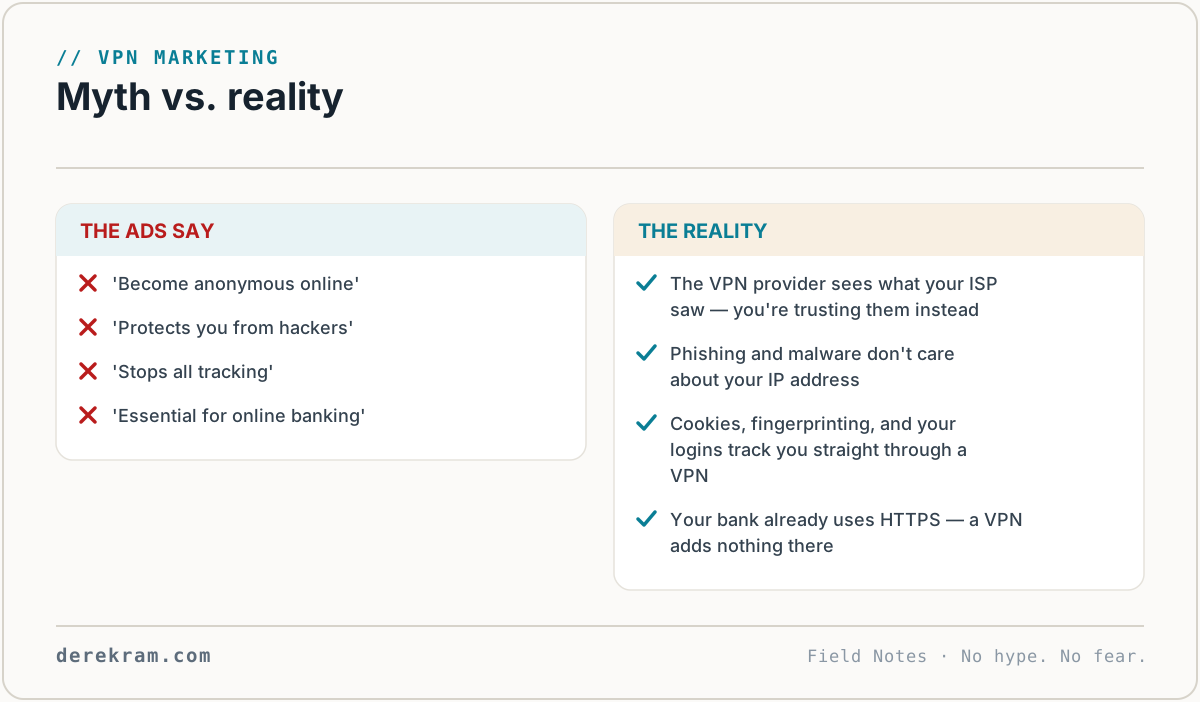
This is what the ads won't tell you:
A VPN does not make you anonymous. The VPN provider can still see everything you do. Your browser fingerprint, cookies, and logged-in accounts still identify you to websites. If you log into Facebook through a VPN, Facebook knows it's you.
A VPN does not protect you from hackers. Getting hacked happens through phishing, malware, password reuse, and unpatched software. None of these involve your IP address. A VPN doesn't help.
A VPN does not stop phishing or scams. If you click a malicious link, you're compromised — VPN or not. If you wire money to a scammer, a VPN doesn't get it back.
A VPN does not protect you from malware. Your computer can still get infected through downloads, email attachments, and malicious websites. A VPN routes your traffic — it doesn't scan it.
A VPN does not hide your traffic from everyone. The VPN provider can see it. Their hosting provider can see it. Law enforcement with a warrant can see it. If the VPN keeps logs (many do, despite saying they don't), that data exists.
A VPN does not protect your data after it reaches a website. Once your traffic leaves the VPN server and goes to the destination website, it's just regular internet traffic. If the website is insecure, your data is exposed.
When You Should Use a VPN
On public Wi-Fi. Coffee shop, airport, hotel, conference center. Especially if you're logging into anything or accessing sensitive information. A VPN encrypts your traffic so people on the same network can't snoop.
If you're in a country with internet censorship. VPNs can bypass government blocks and surveillance. For journalists, activists, and travelers in restrictive regimes, a VPN is essential.
If you don't want your ISP building a profile on you. Your internet provider can see which sites you visit and sell that data. A VPN prevents this by routing traffic through the VPN server. Your ISP sees "connected to VPN" instead of "visited these 47 sites today."
For torrenting. If you're downloading anything via BitTorrent, use a VPN. Copyright enforcement agencies monitor torrent swarms and log IP addresses.
To access geo-restricted content. Some streaming services, news sites, and services only work from specific countries. A VPN lets you appear to be in that country.
When a VPN Is Pointless
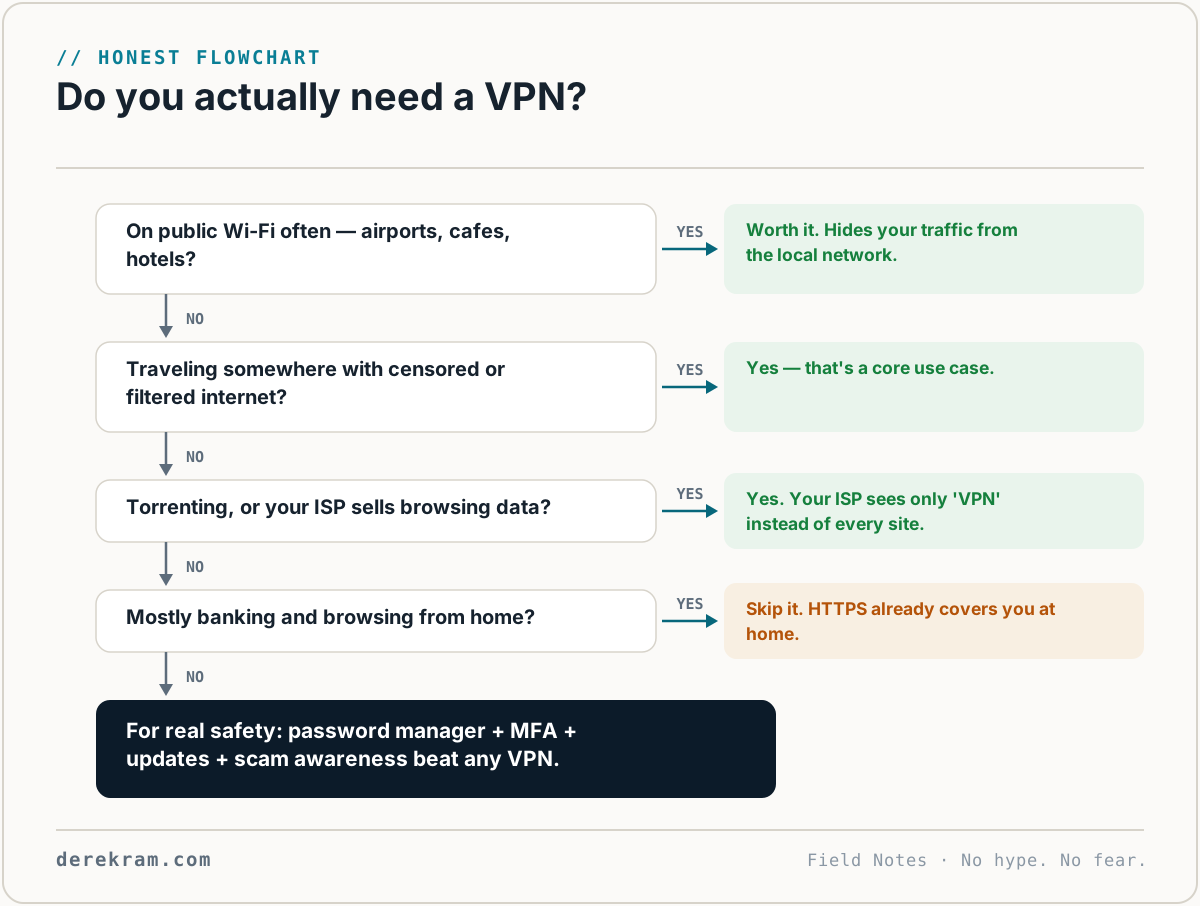
"To be safe online." A VPN doesn't make you safe. Safe online behavior does: password manager, MFA, not clicking suspicious links, keeping software updated, backing up your data.
"To prevent identity theft." Identity theft happens through data breaches, phishing, and stolen documents. Your IP address isn't part of the equation.
"For banking." Your bank already uses HTTPS. The connection between you and your bank is already encrypted. A VPN adds a second layer of encryption that provides no additional security benefit and can actually trigger fraud alerts (banks flag logins from unexpected locations, and VPN servers often show as unexpected locations).
Which VPN to Use (Honest Takes)
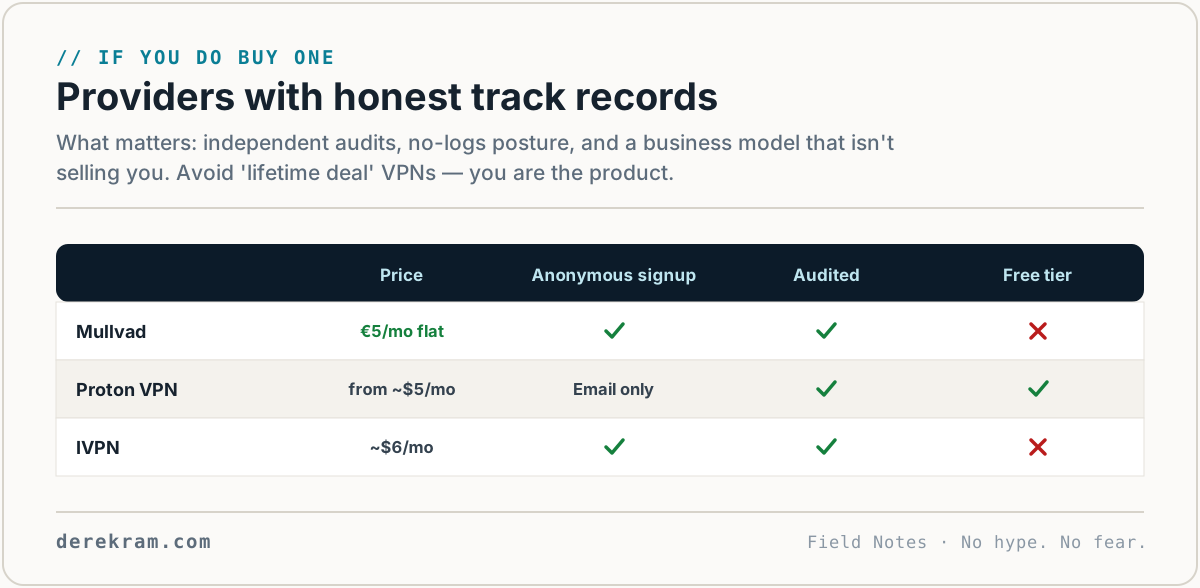
Mullvad VPN — €5/month. Anonymous accounts (no email required), cash accepted, strong no-logging record, regularly audited. Best for privacy purists. Downside: smaller server network, no streaming-optimized servers.
Proton VPN — Free tier available (limited servers/speed), paid from $5/month. Swiss-based, strong privacy laws, part of the Proton ecosystem (email, calendar, drive, password manager). Solid choice. Free tier is genuinely useful for occasional use.
IVPN — $6/month. Transparent, no-logging, open-source apps, accepts cash and crypto. Smaller operation but very well-regarded in privacy circles.
NordVPN, ExpressVPN, Surfshark — heavily marketed, heavily advertised. They work. Their features are real. But the marketing oversells what a VPN does, and their "military-grade encryption" language is meaningless. I don't use these, but millions of people do and they're fine. Just understand what you're actually getting.
What I personally use: Mullvad for my laptop, Proton VPN's free tier for my phone on public Wi-Fi.
The Bottom Line
A VPN is a privacy tool with a specific purpose: it hides your IP address from websites and encrypts traffic on untrusted networks. That's useful. It's not a security suite.
If you buy a VPN thinking you're now "safe online," you've bought marketing, not protection. Safe online behavior — password managers, MFA, skepticism toward unsolicited messages, updating your software — does more for your security than any VPN ever will.
Privacy Tool Comparison — VPNs, password managers, encrypted email, and private search engines compared honestly. Free with the list.
[Join the Digital Self-Defense list →]
Get the 5-Minute Digital Safety Checklist
Four things that make you harder to target. No jargon. No fear. Free.
Get the Checklist →