Stop Using SMS for Two-Factor. Here's Why, and What to Use Instead.
Your bank texts you a six-digit code. You type it in. You feel safer.
You're not.
SMS-based two-factor authentication is the security blanket everyone thinks works. It doesn't. In December 2024, the FBI and CISA issued guidance urging a move away from SMS for account verification — written for high-value targets after the Salt Typhoon telecom breach, but sound advice for everyone. The telecom networks your codes travel through have been compromised by foreign intelligence agencies. Criminals steal phone numbers every day.
If your account's last line of defense is a text message, you don't have a last line of defense.
Why Text Messages Were Never Built for Security
SMS was invented in the 1980s as a messaging protocol. It was designed to fit into tiny gaps in cellular signaling traffic. It was not designed to authenticate bank accounts, email logins, or crypto wallets.
Text messages travel through your carrier's network unencrypted. They pass through towers, switches, and back-end servers that were built for connectivity, not confidentiality. Every point along that path is a place where someone can read, copy, or redirect your code.
The networks are old. The protocols are older. And now they're actively targeted.
Salt Typhoon Made It Real
In late 2024, U.S. agencies disclosed something alarming: a China-affiliated group called Salt Typhoon had compromised at least eight major U.S. telecommunications providers. AT&T. Verizon. Lumen. They accessed call records. For targeted individuals, they accessed the actual contents of calls and texts.
That means your six-digit authentication code went through a network that a foreign intelligence service had already infiltrated. You didn't need to click a phishing link. You didn't need to fall for a scam. Your code simply traveled through a compromised system.
This isn't theoretical. This happened.
SIM Swapping Steals Your Number in Minutes
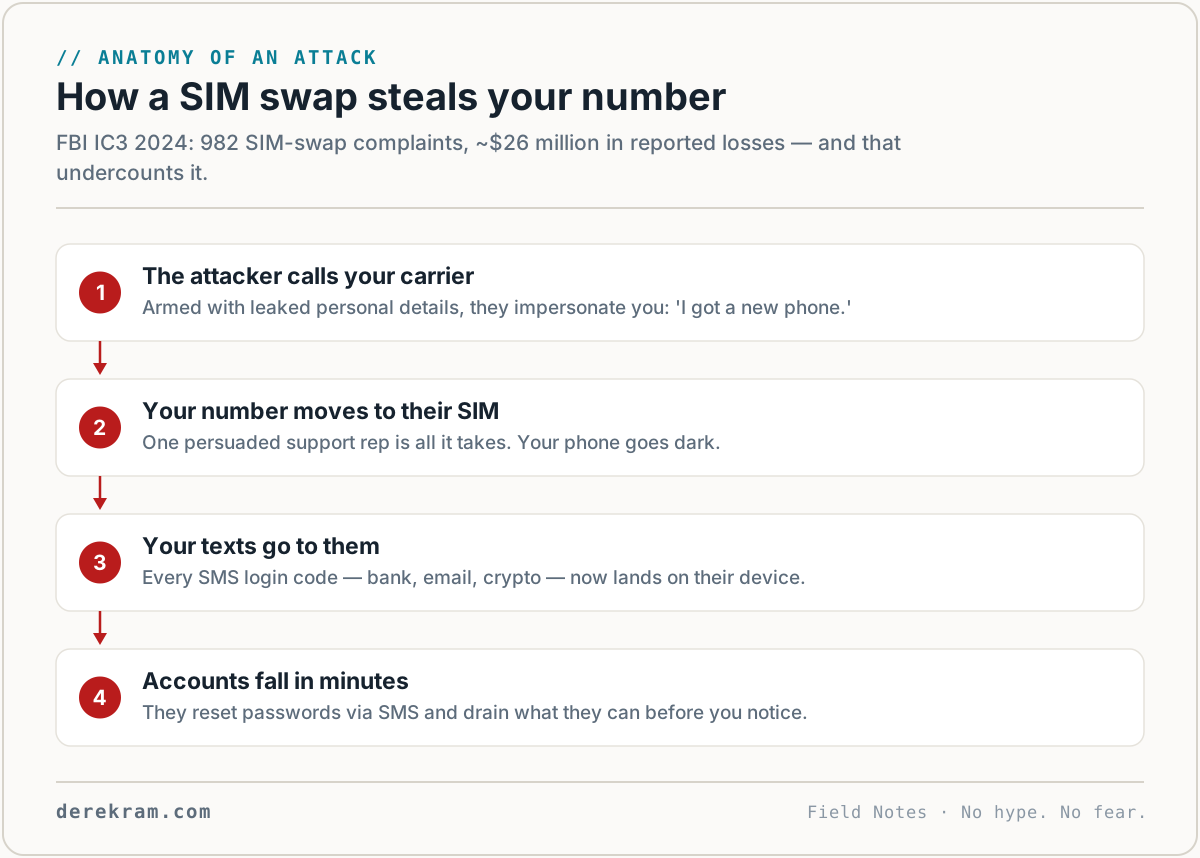
You don't need a nation-state to break SMS 2FA. You just need a convincing phone call.
In a SIM swap attack, a criminal convinces your mobile carrier to transfer your phone number to a new SIM card they control. Sometimes they bribe a store employee. Sometimes they trick customer support. Sometimes they use stolen personal information to answer security questions.
Once they control your number, every text, call, and authentication code goes to them. They reset your email password. They drain your bank account. They lock you out of everything while you're still holding your original phone.
The FBI's 2024 Internet Crime Report documented 982 SIM swap complaints with over $26 million in direct losses. The UK saw a 1,055% year-over-year surge in unauthorized SIM swaps. These numbers are rising, not falling.
The Government Has Already Moved On
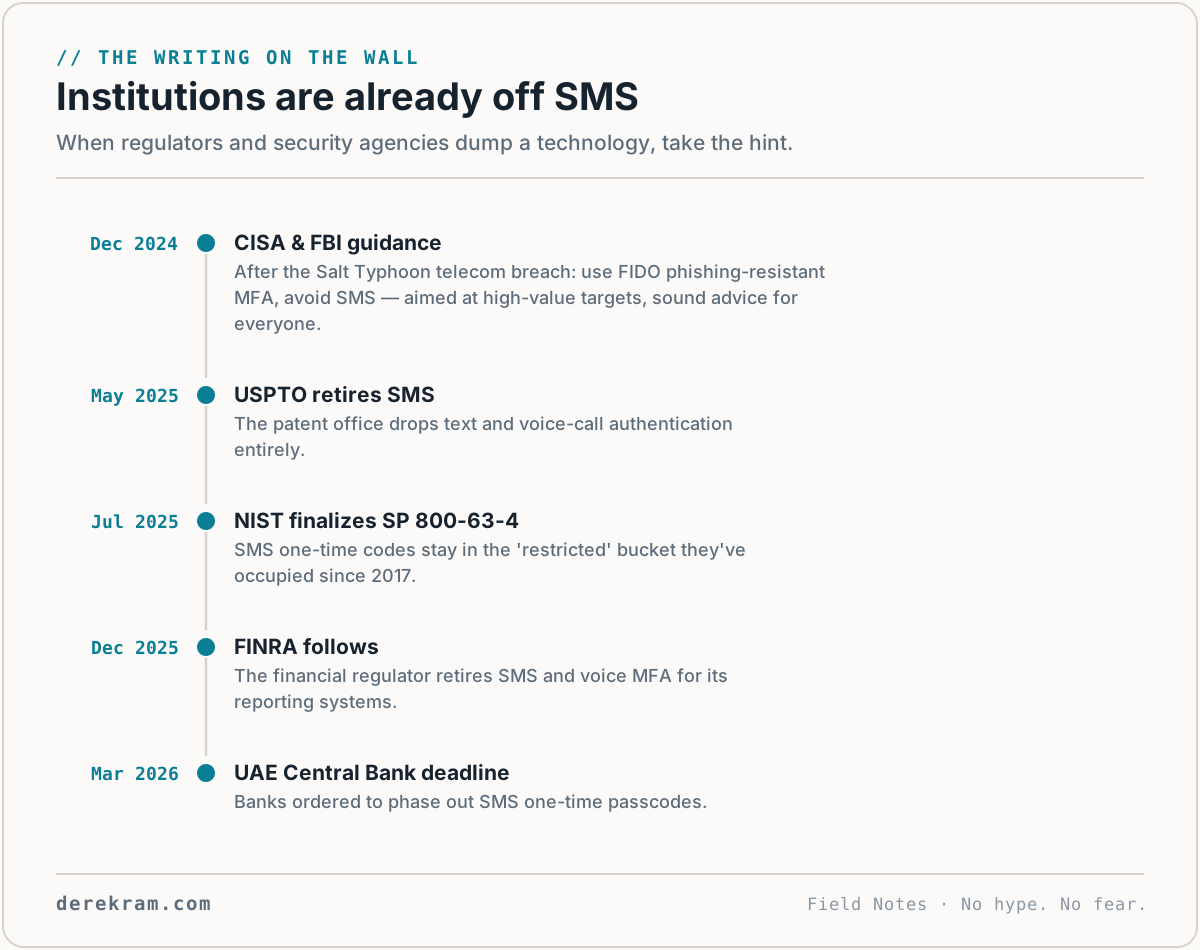
After the Salt Typhoon disclosures, CISA and the FBI didn't just suggest better security. They told Americans to stop using unencrypted SMS for authentication entirely.
NIST updated its Digital Identity Guidelines in July 2025. SMS and phone-based one-time passcodes are classified as restricted authenticators — a second-class status SMS has held in NIST guidance since 2017. If you're building a government system, you have to offer something better. If you're running a bank, regulators expect you to follow.
Countries around the world are phasing SMS out:
The institutions that understand risk have already moved away from text-message codes. Most regular people haven't heard the message yet.
What Actually Works
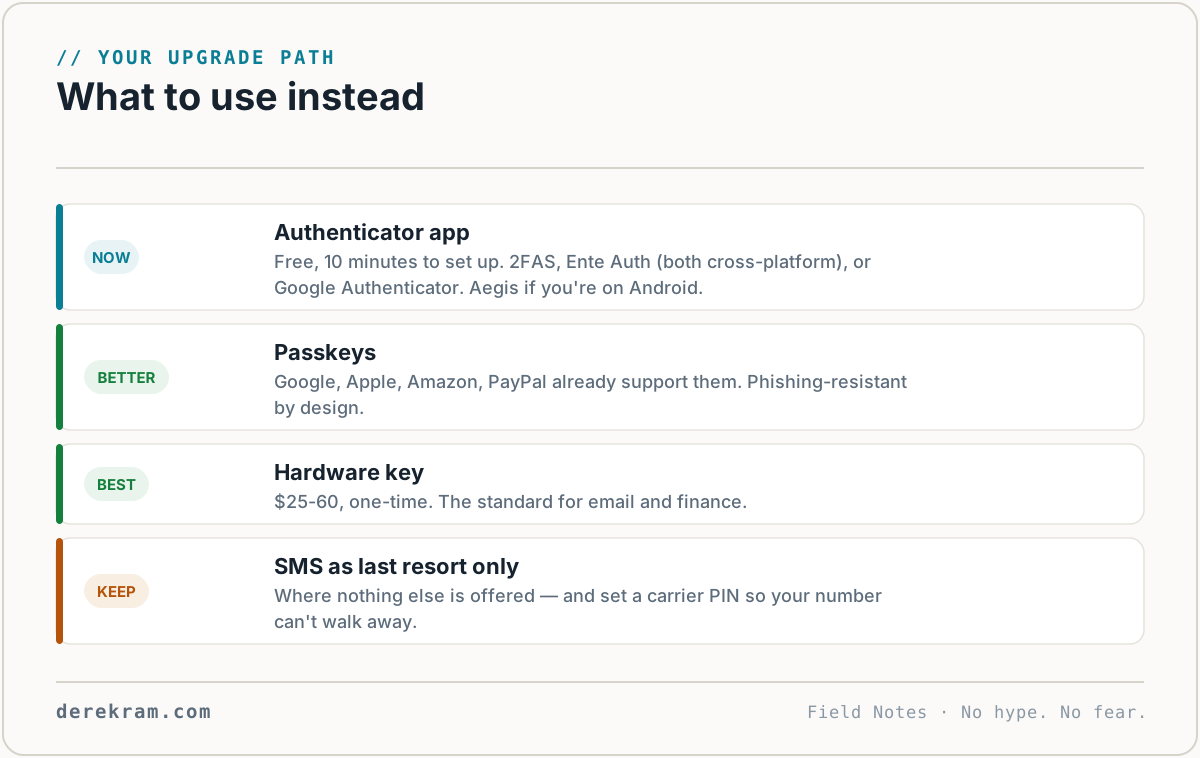
If SMS is broken, what should you use instead?
Authenticator apps. Tools like Google Authenticator, Aegis, or Authy generate time-based codes on your device. The secret stays on your phone. It never travels through a carrier network. A SIM swap can't touch it because the codes aren't tied to your phone number.
Set one up:
1. Download an authenticator app to your phone. Google Authenticator is fine. Aegis (Android-only) has great local backups; 2FAS and Ente Auth are solid cross-platform picks.
2. Go to your account settings on a service you want to protect.
3. Look for "Two-Factor Authentication," "Security," or "Multi-Factor Authentication."
4. Select "Authenticator App" instead of SMS.
5. Scan the QR code with your camera or the app's scanner.
6. Enter the 6-digit code to confirm it works.
7. Save your backup codes somewhere safe. A password manager or a printed note in a locked drawer. Not on your phone.
Hardware security keys. Devices like YubiKey or Google's Titan Security Key are the strongest option. They use cryptographic standards built into modern browsers. You plug it in, touch the button, and you're authenticated. There's no code to intercept. There's no network to compromise. Physical possession is required.
A hardware key costs between $25 and $60. It's the cheapest insurance policy you'll ever buy for your digital identity.
Passkeys. The newest standard. Passkeys create a cryptographic key pair on your device. Your private key never leaves. You unlock it with a fingerprint, face scan, or device PIN. There's no password to phish and no SMS code to intercept. Major services like Google, Apple, Amazon, and PayPal already support them.
What You Should Do This Week
Start with your money. Log into your bank, investment, and payment accounts. Turn off SMS two-factor. Switch to an authenticator app. If the service offers passkeys, set one up.
Then do your email. Your email is the master key to every other account. If someone resets your email password, they can reset everything else. Protect it first.
Then work through your other critical accounts: cloud storage, password manager, social media, anything tied to your identity or money.
Keep your old SMS backup option if you absolutely have to, but make it the last resort. Not the default. The goal is to shrink the window of time where your account depends on a text message.
The Bottom Line
SMS two-factor authentication was a reasonable idea in 2012. In 2026, it's a liability.
Your text messages travel through networks that foreign intelligence agencies have compromised. Your phone number can be stolen in a single customer service call. The government agencies responsible for national cybersecurity have told you to stop using it.
You don't need to become a security expert. You just need to spend fifteen minutes switching your most important accounts to something better.
An authenticator app is free. A hardware key is cheap. Both are dramatically more secure than trusting a text message.
Start with one account today. Your bank. Your email. Just pick one and fix it.
Get the free Account Security Checklist — a step-by-step guide to locking down your logins without the jargon. Covers authenticator apps, hardware keys, passkeys, and the settings to change this week.
[Join the Digital Self-Defense list →]
Get the 5-Minute Digital Safety Checklist
Four things that make you harder to target. No jargon. No fear. Free.
Get the Checklist →